
How to rip/convert Blu-ray to Apple ProRes 422/4444 codec MOV format? In this article you will get the best Blu-ray to Apple ProRes converter for Mac and Windows.
Blu-ray movies are popular due to its high-definition video quality, many people buy Blu-ray movies to watch them on HDTVs, we can get better visual enjoyment. Have you collected a lot of Blu-ray disc movies? If yes, that will be wonderful. Besides playing Blu-ray movies on HDTV or portable devices, some Blu-ray users also have the need to convert Blu-ray movies, or edit Blu-ray with Final Cut Pro or DaVinci Resolve in order to use some video materials. But most of them have encountered the problems when they try to import Blu-ray to Final Cut Pro or DaVinci Resolve.
“I have to convert one of my Blu-ray movies into compatible format for Final Cut Pro on Mac, I need to use some content of the Blu-ray in Final Cut Pro. Can you tell me which software can help me to convert Blu-ray to Final Cut Pro? What’s the best format for Final Cut Pro editing? Any suggestion will be appreciated.”
After inserting a Blu-ray disc into an external optical drive, I open the media pool in DaVinci Resolve and directly drag in either the index.bdmv file or the .m2ts files located under BDMV/STREAM. The software either does nothing at all or pops up a warning saying “unsupported or corrupted file format.” I never see any editable footage appear in the media pool.
Just as showed above, in order to import Blu-ray to Final Cut Pro and DaVinci Resolve, you will need to convert Blu-ray to their supported format. From Apple Final Cut Pro and DaVinci Resolve product page you will learn Apple ProRes codec is their native codec for editing, so before loading Blu-ray to them, you will need to convert Blu-ray to Apple ProRes codec MOV format, only thru this method can you edit Blu-ray with Final Cut Pro and DaVinci Resolve natively, and you don’t need to render the videos anymore.
Step-by-step guide to rip/convert Blu-ray to Apple ProRes codec
1. Download the best Blu-ray to Apple ProRes converter Mac version or Windows version from our website, install the software on your computer. Just double click the icon to run it, you will see this program’s main interface.
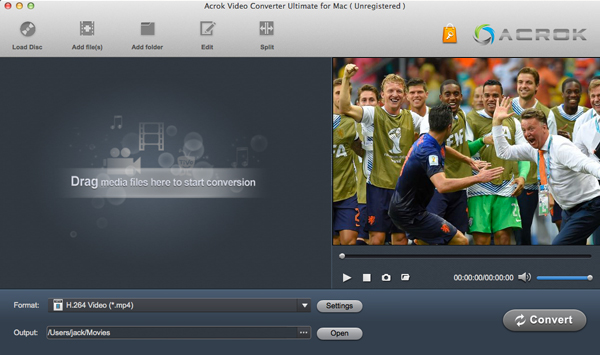
2. To use this Blu-ray to Apple ProRes converter is so easy, even if you have not used any Blu-ray/HD converting tool, you can get your videos converted with just few clicks. After launching the software, please click load disc button to import your Blu-ray movies.
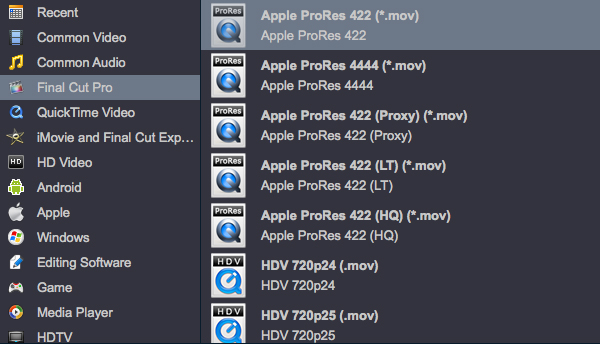
3. After loading the Blu-ray, please click format column to choose Apple ProRes 422/4444 codec for output. This Blu-ray to Apple ProRes converter has rich output formats, you can choose anyone according to your need.
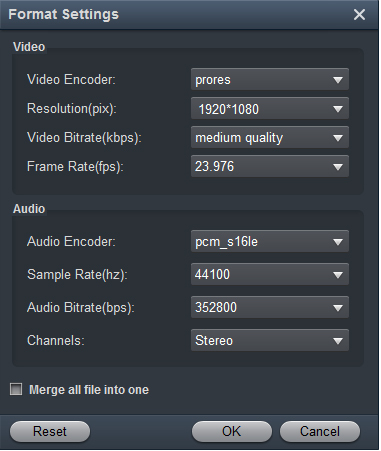
4. If you want to adjust the output settings, please click settings button on the interface, and then adjust the resolution, bitrate, etc.
5. The last step is to click convert button to start the Blu-ray to ProRes 422/4444 conversion. Please wait some time, this Blu-ray to Apple ProRes converter will rip/convert Blu-ray movies at fast speed and top video/audio quality, when the conversion process finished, you can get your files and import to FCP X for editing without any problems.
More functions of this Blu-ray to Apple ProRes converter
- Rip Blu-ray dsic, Blu-ray ISO/Folder to common videos.
- Rip/convert DVD movies to ProRes or other formats.
- Convert HD videos like MKV, AVI, MOV, M4V, MP4, WMV, etc.
- Optimized formats for FCP X, iMovie, Premiere Pro, Sony Vegas, Avid.
- Presets for smartphones, tablets, HDTVs, etc.
- Powerful editing feature like trim, crop, add watermark, adjust effect, etc.
- Choose different subtitles and languages in Blu-ray/DVD movies.
Leave a Reply