

Avid DNxHD is a widely used mezzanine codec in post‑production, especially in Avid Media Composer workflows. However, when collaborating with teams using Final Cut Pro or other ProRes‑native environments, you may need to convert DNxHD to Apple ProRes 422 or ProRes 4444 without quality loss.
This article provides a complete guide to transcoding DNxHD (including various bitrates like 36, 115, 175, or 185 Mbps) to ProRes 422 for visually lossless, high‑performance editing, or to ProRes 4444 for 4:4:4 color fidelity and alpha channel support.
Adout Apple ProRes
Apple ProRes is one of the most popular codecs in professional post-production. The ProRes family of video codecs has made it both possible and affordable. It is the successor of the Apple Intermediate Codec and was introduced in 2007 with Final Cut Studio 2. It is widely used as a final format delivery method for HD broadcast files in commercials, features, Blu-ray and streaming. ProRes supports different data rates and different resolutions. All ProRes422-variants use Chroma subsampling of 4:2:2 at 10 Bit Color depth. ProRes 4444 samples color in the 4:4:4 schema with a color depth of 12 Bit.
| Resolution | fps | ProRes 422 Proxy | ProRes 422 LT | ProRes 422 | ProRes 422 HQ | ProRes 4444 (without Alpha) | ProRes 4444 XQ (without Alpha) |
|---|---|---|---|---|---|---|---|
| (points) | (Hz) | (Mbit/s) | (Mbit/s) | (Mbit/s) | (Mbit/s) | (Mbit/s) | (Mbit/s) |
| 720 × 576 | 50i, 25p | 12 | 28 | 41 | 61 | 92 | 138 |
| 1280 × 720 | 50p | 19 | 42 | 61 | 92 | 138 | 206 |
| 1440 × 1080 | 50i, 25p | 32 | 73 | 105 | 157 | 236 | 354 |
| 1920 × 1080 | 50i, 25p | 38 | 85 | 122 | 184 | 275 | 415 |
| 50p | 76 | 170 | 245 | 367 | 551 | 826 | |
| 2048 × 1536 | 25p | 58 | 131 | 189 | 283 | 425 | 637 |
| 50p | 117 | 262 | 377 | 567 | 850 | 1275 | |
| 3840 × 2160 | 25p | 151 | 342 | 492 | 737 | 1106 | 1659 |
| 50p | 303 | 684 | 983 | 1475 | 2212 | 3318 | |
| 4096 × 2160 | 25p | 162 | 365 | 524 | 786 | 1180 | 1769 |
| 50p | 323 | 730 | 1049 | 1573 | 2359 | 3539 | |
| 5120 × 2880 | 25p | 202 | 456 | 655 | 983 | 1475 | 2212 |
| 50p | 405 | 912 | 1311 | 1966 | 2949 | 4424 |
Apple ProRes is one of the most popular codecs in professional post-production.The ProRes family of video codecs has made it both possible and affordable to edit full-frame, 10-bit, 4:2:2 and 4:4:4:4 high-definition (HD), 2K, 4K, 5K, and larger video sources with multistream performance in Final Cut Pro.
About Avid DNxHD
DNxHD is a video codec intended to be usable as both an intermediate format suitable for use while editing and as a presentation format. DNxHD data is typically stored in an MXF container, although it can also be stored in a QuickTime container. Avid DNxHR and DNxHD enable media professionals to scale high-res and HD media into everything from lightweight yet beautifully detailed mezzanine files, up to visually lossless mastering quality, significantly reducing file sizes – as well as bandwidth and storage requirements – o accelerate your production workflow.
| Resolution | Frame Size | Chroma Subsampling | Bits | Frames Per Second | Megabits per second | Minutes per Gigabyte |
|---|---|---|---|---|---|---|
| Avid DNxHD 440x | 1920 x 1080 | 4:2:2 | 10 | 60 | 440 | 0.325 |
| Avid DNxHD 440 | 1920 x 1080 | 4:2:2 | 8 | 60 | 440 | 0.325 |
| Avid DNxHD 290 | 1920 x 1080 | 4:2:2 | 8 | 60 | 291 | 0.492 |
| Avid DNxHD 90 | 1920 x 1080 | 4:2:2 | 8 | 60 | 90 | 1.585 |
We can record DNxHD or DNxHR footage with your camera or camcorder, can we load DNxHD/DNxHR videos into Final Cut Pro X for futther editing? Editing DNxHD in FCP But mind you, they are DNxHD QUICKTIMES, not tha native Avid MXF files, so yes, you can edit them. External monitoring is not possible with any capture card. If you switch your sequence to uncompressed 10-bit, then your footage will require rendering at some point. So for importing and editing DNxHD/DNxHR video codec in Final Cut Pro smoothly, you need to transscode DNxHD/DNxHR to ProRes codec via best Apple ProRes Converter.
How to Convert DNxHD to ProRes with the best Video Converter?
How to change DNxHD to ProRes 422 or ProRes 4444? Well, Acrok Video Converter Ultimate for Mac is a powerful all-in-one video converter for Mac and Windows. It can transcode DNxHD easily to any other format. It is a complete combination of video converter, Blu-ray Ripper, DVD ripper and video editor. Many professionals recommend it due to its excellent features such as video conversion speed, Blu-ray files conversion to Full HD videos, trim vdeos, improve video quality, etc.
Get the Best DNxHD to ProRes Converter – Acrok Video Converter Ultimate
- Easy Conversion: Effective conversion of DNxHD/DNxHR to ProRes 422/4444 as well as other 150+ video format with original resolution in an optimized format.
- Lossless Conversion: Support Lossless Conversion for all H.264 encoder video format at 30X faster speed than other converter.
- Powerful Editing Features: Change Resolution/brightness, Bit rate settings, encoder, contrast/saturation and other video effects.
- Rip Blu-ray: Rip and Convert Blu-ray to tablet, smartphone, smart tv, media player software, as well as convert DVD files into popular video formats.
- Convert video for editing Software: Convert 6K/4K/1080P/720P footage for Final Cut Pro, iMovie, Premiere Pro, Vegas Pro, DaVinci Resolve. etc.
Steps on onverting DNxHD to ProRes with Acrok Apple ProRes Converter
The following steps will show you the DNxHD to Apple ProRes 422/4444 conversion process on Mac in detail. Windows user can actually do the same as on Mac. First please download the install Acrok Video Converter Ultimate for Mac on your computer. Ready? go!
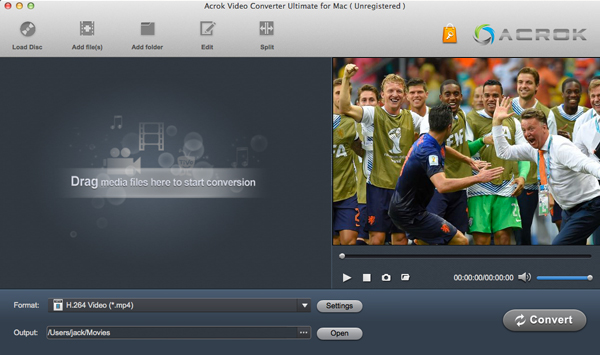
Step 1: Load DNxHD files
First of all launch Acrok Video Converter Ultimate Ultimate to start the conversion of DNxHD to ProRes. You could drag & drop the DNxHD files or simply click the “Add Files” button to import DNxHD files for conversion. In case of batch conversion of DNxHD files, select multiple videos or drag & drop videos one by one.
2. Choose the output format
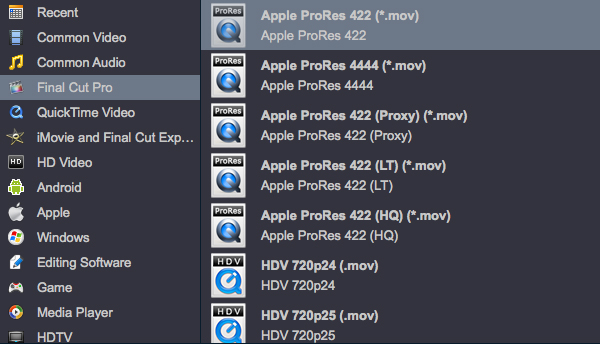
In this step, select the video format that contains encoder Apple ProRes, such as ProRes 422 MOV or ProRes 4444 MOV, then click the Setting icon. The pop-up window will appear where you can modify the encoder as ProRes. You are also allowed to modify other encoder settings according to your need.
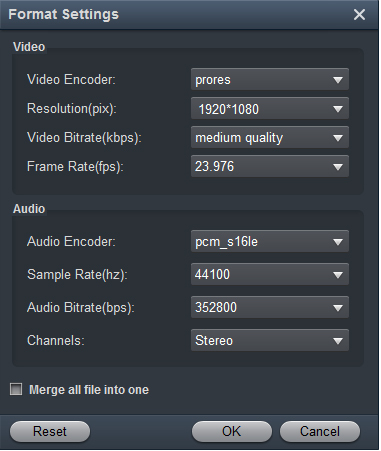
After you choose the output format, you can set DNxHD to ProRes Conversion Parameters by clicking the settings button in the main interface of the software. You can adjust the resolution, bitrate, codec as you need.
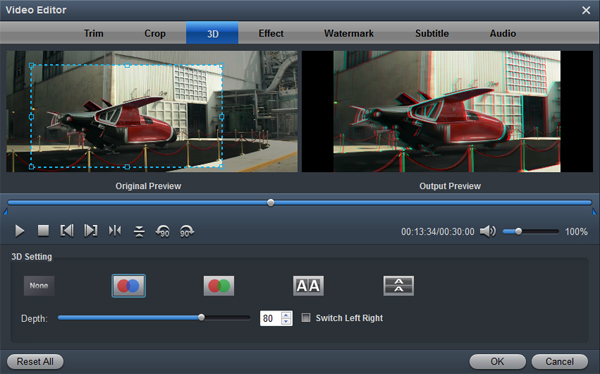
To edit your DNxHD videos, click the Edit button to open the video editor window. And then you can trim the video, crop video size, deinterlace, add some special video effects, add watermarks, attatch subtitles and more.
3. Convert DNxHD to ProRes with 1 click.
Before beginning the conversion of DNxHD files to ProRes, select the file destination folder to save it in your Windows PC or Mac. After that, select “Convert” button to start the conversion process of DNxHD to Apple ProRes file format. The conversion process will start immediately. It will only take few seconds of your time, after that you could enjoy the videos.


Leave a Reply