
Learn how to convert DVD footage to Apple ProRes 422 or ProRes 4444 on macOS for professional video editing, color grading, or archival. DVDs often use compressed MPEG-2 codecs inside VOB containers, which are inefficient for modern NLEs like Final Cut Pro, Premiere Pro, or DaVinci Resolve. Transcoding to ProRes unlocks smoother playback, better color accuracy, and frame-accurate editing.
DVD to ProRes Converter Reviews:
I have had good results with DVDs and I am able to edit DVD in Final Cut Pro with no problems. The Apple ProRes profiles are so smart.
I want to edit DVD video in FCP. I download your DVD to ProRes Converter and saw that I could rip all the discs and I had for this a very good impression. The audio/video synchronization is very good, the size of the subtitles too.
DVD-Video is a standard for storing and distributing video/audio content on DVD media. DVD-Video became the dominant form of home video distribution in Japan, the United States and other developed country and developing country. Many HD camcorders support DVD recording, we can record videos into DVDs via camcorders. Compared with videotape, DVD is a better content to storage files.
You may want to edit DVD in Final Cut Pro (X, 7, 6), but how to import DVD files to FCP X, FCP 7 and FCP 6, including DVD IFO/ISO, transferred VOB files? You need to convert DVD files to FCP best compatible video format, such as ProRes MOV. For converting DVD on Mac, DVD to ProRes Converter can help you do the job. With DVD to ProRes Converter, you can transcode DVD IFO/ISO and VOB files to ProRes 422 or ProRes 4444 on Mac. And the DVD to Final Cut Pro Converter supports some editing functions.
Free download DVD to ProRes Converter trial version
How to convert DVD to ProRes for Final Cut Pro importing?
Step 1: Load DVD Files
Insert DVD into your Mac DVD Rom, and start to run DVD to ProRes Converter to load DVD by clicking load DVD icon. You’ll see all the DVD info listed in DVD to ProRes 422/4444 Converter.
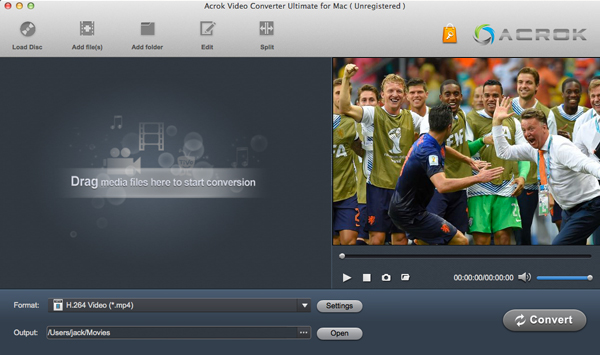
Tip: You can choose a subtitle from loaded DVD files.
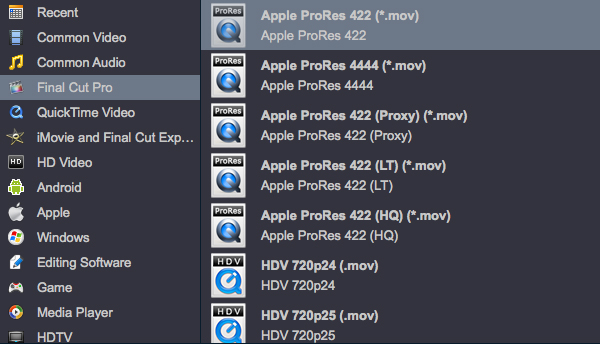
Step 2: Choose ProRes MOV As Output Format
In this step, you need to choose the ideal output video format, “Apple ProRes 4444 (*mov)” is your best choice.
Tip: The “Apple ProRes 422 (*mov)” profile can help you convert DVD to 1080P MOV.
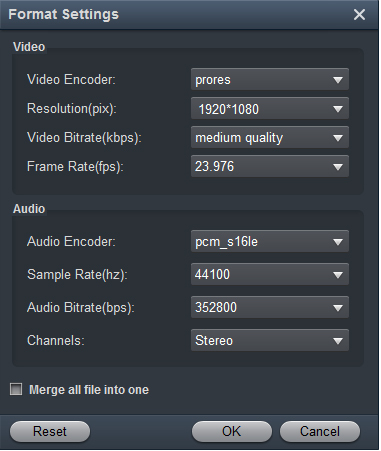
If you like, you can click “Settings” button to change the audio and video parameters in “Settings” window.
Step 3: Convert DVD to ProRes Codec On Mac
Click the convert button under the preview window, start the DVD to ProRes 422/DVD to ProRes 4444 conversion.
After DVD to ProRes conversion, click “Open” button, and you can import the converted DVD files into FCP X, FCP 7 and FCP 6.
Tip: You can convert any format (MKV, AVI, MOV, MPEG-2, WMV etc.), DVD, Blu-ray to ProRes codec for Fianl Cut Pro via this DVD to ProRes Converter.
Leave a Reply